Commission Rate Plan Basics
Commission Rate Plans provide flexible methods
of meeting Client requirements for complex contingency terms
which change on scales mitigated by ranges of criteria.
As at the current shipping version CV11.6.2.2, the types of
rate plans that are supported in the software are as follows:
- Age
- List Amount
- Payment Amount
- Paid To Date
- Payment Days From Listing
- Payment Days From Delinquent
- Payment Days From Charged
- Remaining Balance
For these rate plans to work successfully, there are two
important considerations:
- That your plans are constructed such that
each level in a scaled rate properly intersects
with the next level in a smooth progression that
leaves no area in the defined data-set unaccounted
for. Example - if your plan is List Amount based
and the first tier is $0.00 to $500.00, your
second tier in the plan would start at $500.01
and NOT at $501.00 because the latter will leave
any account assigned in a balance range of
$500.01 to $500.99 unaccounted for in the tier
definition.
- For greatest new account input efficiency, it
makes sense to have the appropriate rate plan
affixed to each Client BEFORE you begin entering
new accounts. This will allow the rate plans to
be embedded with the Client driven rate plan as
they are being entered rather than having to
rely on an operator to remember to insert one on
every account AND not to have any typo errors
in the process of manually entering them. Having
your Clients properly defined in advanced not
only saves on human resource time, it mitigates
the margin for error if the insertion of such an
important piece of information is reliant on an
automated process rather than a person.
Once a Rate Plan is attached to a Debtor, all
transactions of the Financial Type "Payment" will
be managed as per the rules set out in the rate
plan. It is an operational choice whether to ascribe a
Rate Plan entry for a flat rate (i.e. 25% and no
Levels or Tiers) or whether to simply hardcode flat
rates onto Clients and into Debtors.
If your operation is small and very few Clients utilize
true Multi-Level Rate Rlans, reserving them ONLY
for those few Clients who need them may be the
simplest method.
If your operation is larger and you have many Clients
who utilize unique Rate Plan structures, there is
merit to having operational standardization which
dictates that all Clients have defined Rate Plans.
Large Clients that change their terms often get
their own unique Rate Plans to prevent any changes
made to one Client's contingency structure
inadvertently affecting other Clients who may be
sharing that plan.
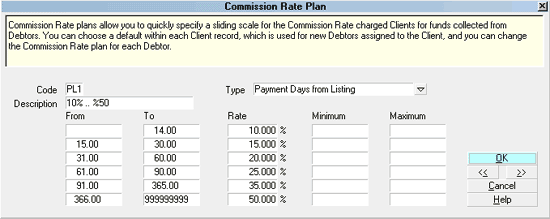
Commission Rate Plan Screen
Accessing Commission Rate Plan
The Commission Rate Plan setup menu can be
accessed three ways. Which way you choose will be determined by
your Operator level access rights and navigational preferences.
- Using the menu bar at the top of screen, the menu path
is "System\ Financial Settings\ Commission Rate Plans". Once
inside, your list of existing plans will be presented with
the customary buttons to Delete/ Edit/New entry.
- From the Main Menu, the path is from the buttons on the left
side of the screen, " System Administration\Setup and
Configuration\ Plans and Reference Tables\Commission Rate Tables".
- Or, while on ANY screen which has a "Rate plan" field
attached to a pick list pulldown menu, specifically
a Debtor Commission Tab or Client Commission Tab,
you may make a selection from the list to update or modify
the record you are on for the list which shows you the
selection of all currently available plans in the system.

See Also
- Client Topics
| 
Was this page helpful? Do you have any comments on this document? Can we make it better? If so how may we improve this page.
Please click this link to send us your comments: helpinfo@collect.org