Comprehensive Correspondence History
You can reproduce upon demand a copy of any correspondence
sent to a Debtor or Client. Collect! enables you to save a copy of
all letters printed to the printer or to Email, either individually or in
your daily batch. Retrieve any information that was on any letter
that you send. Collect! saves an exact copy of each letter.
providing a complete correspondence history that you can quickly
view in Print Preview. Email contents are stored as text only.
Whenever you print a letter to the printer or to Email, either
individually or in your daily batch, Collect! will save a
snapshot of the letter internally with the Letter contact.
By clicking on the open file icon next to the 'Letter" field in the
Contact form, the saved letter will open in the Print Preview window.
This will display the letter as it was originally printed. If the letter
consisted of multiple pages, all pages are accessible.
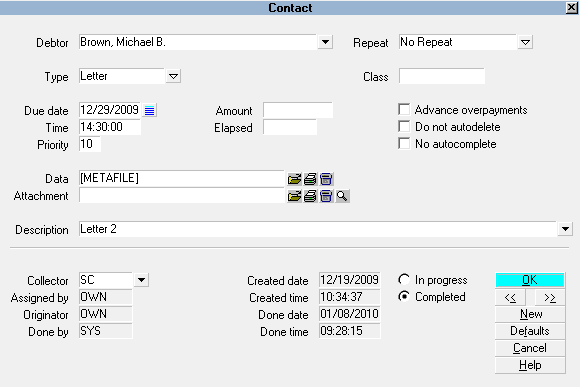
Letter Metafile Stored in Letter Contact
You can print a copy of the letter by clicking the PRINT button in
the Print Preview window.
Email letter contents are not turned into a metafile, they are
stored as text only. When opening the email blob, Collect!
uses its standard Text Editor.
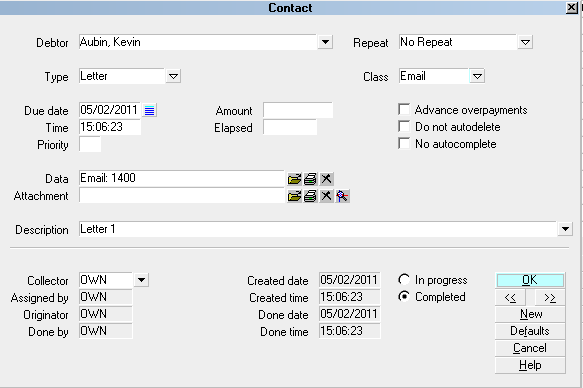
Email Blob Stored in Letter Contact
 You can enable/disable creation of Metafiles in the
Client settings and in the contact plan's Letter Event. This
gives you added flexibility for storing these metafiles, as
needed.
You can enable/disable creation of Metafiles in the
Client settings and in the contact plan's Letter Event. This
gives you added flexibility for storing these metafiles, as
needed.
 The letter copy saved during normal printing is
saved within the database as a metafile in the contacts blob.
Collect! also saves a copy of a letter when you Print to Screen,
edit and save the letter. When you print to RTF the letters are
actual files saved to your computer.
The letter copy saved during normal printing is
saved within the database as a metafile in the contacts blob.
Collect! also saves a copy of a letter when you Print to Screen,
edit and save the letter. When you print to RTF the letters are
actual files saved to your computer.
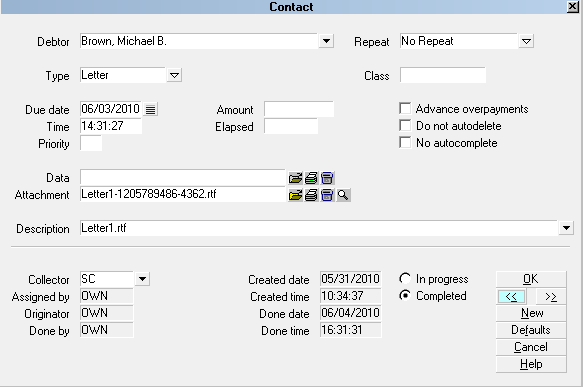
Letter RTF File Attached to Letter Contact
Metafile Image Storage
With Collect! version 11.6 Build 1.1 and newer, Collect! no
longer stores images in Metafiles.
When Collect prints to a METAFILE, the BITMAP or PNG files within
the METAFILE are removed and then stored in the "styles\metaref"
folder. The file names of the pngs/bitmaps are hash numbers
derived from the pixels in the image and have an .mrf
extension. These files can only be opened by Collect!. If a file with the
same hash number exists, it is assumed to be the same image.
The associated BITMAP or PNG files in the original METAFILE are then
replaced with a custom BITMAP REFERENCE record that contains only
the 32 bit hash value as well as the destination position and scaling data
for the image.
When a METAFILE containing the new BITMAP REFERENCE records
is printed, the hash number is used to locate the file in
the styles\metaref folder which contains the actual pixel
data. If the file does not exist, no image will be printed.
Reports that print images do not need to change and neither do the
source bitmaps. The metaref folder will be updated automatically as new
images are detected. Identical images, regardless of the original filename,
will always generate the same hash number and therefore will only exist
once in the metaref folder.
This will significantly slow down the expansion of the contact blob file as
it will no longer contain image data. Additionally, Collect! will no longer
store multiple copies of the same image due to the hashing technique.
Hash collisions are possible but are rare. In the event that two different
images generate the same hash value, the older image will be displayed.
Files in the metaref folder are never overwritten by Collect! once they are
created. If a hash collision does occur, the best solution is to modify the
source image slightly. Just one pixel will be enough to result in a different
hash value.
There is no utility to convert METAFILES that already exist on
contacts due to performance issues. They can still be printed normally
though. METAFILES with embedded images are quite large and can
take as long as an entire second to process a single contact. That's
about 27 hours to process 100,000 contacts and there could potentially
be millions of them.

Summary
Collect! enables you to save a copy of any correspondence
sent to a Debtor or Client. You can instantly retrieve and
reprint, if necessary. any information on any letter that you send.
Letters printed to printer are stored as metafiles, complete
with formatting and graphics. Letters printed to Email are
stored as text only, just as they would be saved if you sent an
Email directly from an account. This feature may be switched ON
or OFF at the Client level through Client Settings.
See Also
- Contact
| 
Was this page helpful? Do you have any comments on this document? Can we make it better? If so how may we improve this page.
Please click this link to send us your comments: helpinfo@collect.org