Client Notes
As with debtor accounts, the software provides a subfile
Note Tab on the client profiles which allows you to enter
and store notes on any Client record. To access the Client's
Notes you must have a Client screen open. Click the Tab labeled
Notes to display what existing notes or add new notes.
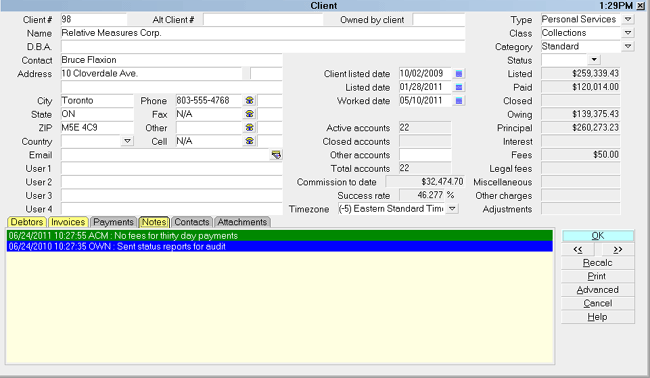
Client Notes
Notes are stored with automated date/time/ Operator ID footprints
in the same manner as Debtor Notes. Operator color settings
will follow the same convention as per Operator Setup.
All the functionality of Debtor's Notes, including reports
are available when you need to utilize and/or extract data
from Client Notes.
As of version CV11.6.2.9, the Client Notes function was
enhanced so that any field Access Rights where the check box
for " Log to Notes" is turned ON, the "old" information will now
write to the Client Notes tab with a user date/time stamp and
an indicator of what field has been changed and stores the
previous information in said noteline.
For example, if you updated the D.B.A. field on the client
from ABC Company to DEF Corporation, you'd generate a noteline
in the client note tab that read:
"06/03/2015 12:30:28 OWN : Old Client-> D.B.A. ABC Company".
Importing Client Notes
As of version CV11.4.3, and newer, you can import and export
Client Notes, Client Attachments, Client Contacts and Payments.
This requires that you are licensed for the optional Import/Export
module. When importing Notes, it is necessary to create a
valid Date/time stamp so that the notes will display in sorted
order.
Sample import maps are shipped with Collect! and are
available for download from the Member Center.

Date/Time Stamp Format
The dates in the Debtor and Client note time stamps will
appear formatted using the date options specified in
Collect's Date Format settings. This screen is accessed
through "System\ Preferences\ Options, Sounds and Colors".
Click the Date Format button in the lower right corner of the
Screens and Messages popup.
When notes are read from the database, the system will convert
the original dates into the format preference you have specified
in the Date Format screen. The shipping default is "Month Day Year"
with a Date Separator of slash ("/"). When the notes are written
into the database, ALL the time stamp dates are converted into
YYYYMMDD format without any separators.
For longstanding users who have converted over time from
versions below CV11, there is one special case when reading
old (pre-CV11) note dates, where Collect! cannot know what
format a date is in. It is MM/DD/YYYY or DD/MM/YYYY format
and both the month and day are less than 13. Collect! cannot
know which one is the month and which one is the day. The
current date settings cannot be relied on because the user
may have changed them.
To solve this, a new file is created in the bin folder
called "dateformat.dat". It contains a format string
representing the current date settings at the time it
is created and represents the format of the dates in
the existing notes. If the file exists, it is left alone.
The user is free to change their date format settings
in the preferences after this file is created.
When Collect! reads the notes and encounters an
unconverted date in XX/XX/YYYY format where both
the month and day are less than 13, it will use
the data in 'dateformat.dat' to determine which
Fields represent the month and day. In all other
cases, the month and day can be figured out easily.
When the notes are written back, all the dates are
CONVERTED to the YYYYMMDD format.
This Date Format functionality is available in as of
version CV11.6.1.1.
See Also
- Client Topics
- Import/Export Topics
| 

Was this page helpful? Do you have any comments on this document? Can we make it better? If so how may we improve this page.
Please click this link to send us your comments: helpinfo@collect.org