Debtor Notes
Collect! enables you to store unlimited information regarding
your accounts in the Debtor Notes section. Notes are
automatically date\time\status stamped with the ID of the
operator you are signed in as. Settings for the Operator enable
you to display note lines in different colors.
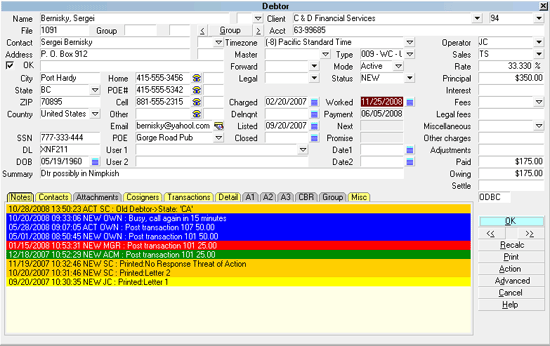
Debtor Notes
When you first view a debtor account, Collect! displays
one screen of note lines. This allows you to quickly scan
the most current notes, or the notes that you have flagged to
be brought to the top of the notes. If you are using the notes
color feature for your operators, you will also note that these
preview notes are color coded according to the operator
settings. This allows you to quickly determine who or
what department made the last notes for this debtor,
using not only by the date/time/status and operator ID
stamp, but also color.
Whenever an operator clicks into the notes display, then
Collect! displays contents that you can scroll through.
Everything will remain the same except that you will not see
the note lines in color.
Date/Time/Status And Operator ID Stamp
When a user selects the notes area, Collect! will automatically
start the note line with the date, then time, then status code
and finally the operator ID who is currently signed in. With
access rights set correctly, users cannot modify or delete
this time stamp. Any notes entered are started after the time
stamp and then word wrapped accordingly as the user enters
notes.
You may use Status Codes between 1 and 4 characters
and Operator IDs that are between 1 and 6 characters
without affecting the length of the Note Date/Time/Op ID
stamp.
Notes made in quick succession, by contact plans for
example, will sort correctly because the Time stamp
records milliseconds.

Flagging A Note Line To Stay On The Top
Another feature available to users is the ability to bring any
note line to the top of the notes. Typing an asterisk [*]
in front of the date time stamp forces Collect! to bring
the line to the top of the notes when viewing or editing.
Applying Color To Note Lines
This feature allows users to instantly see, by color, who has
entered a particular note. By using the field labeled
Notes Color on the Operator form, you can specify what
color a note line will appear in when viewing the Notes field
on the Debtor screen. You may set your accounting
operators to shades of green, your collectors to shades of
blue, and your management to shades of red, for example.
Then, when you bring up a Debtor account, you could
instantly identify, by the color, who has recently been
making notes for the account.
Access Rights To Notes
Collect! has a unique feature with respect to Notes access.
If you flag the Debtor Notes to be READ ONLY, Collect! will
still allow any user to add notes, but they will not be able
to modify or delete any previous note lines. Please refer
to Help topic, Change Debtor Notes to Read Only for
details.
Debtor's Notes may be accessed with the report writer.
So you can design reports to print the notes or a specific
number of note lines.
Date/Time Stamp Format
The dates in the Debtor and Client note time stamps will
appear formatted using the date options specified in
Collect!'s Date Format settings. This form is accessed
through System-> Preferences- Options, Sounds and Colors,
Select the DATE FORMAT button.
When notes are read from the database, Collect! will convert
the original dates into the format Collect! has specified in the
preferences. This is what will be displayed to the user.
When the notes are written back into the database, ALL the
time stamp dates are converted into YYYYMMDD format
without any separators.
There is one special case when reading old note dates,
where Collect! cannot know what format a date is in. It is
as follows.
The date read from the notes is in MM/DD/YYYY
or DD/MM/YYYY format and both the month and day are
less than 13. Collect! cannot know which one is the month
and which one is the day. The current date settings cannot
be relied on because the user may have changed them.
To solve this, a new file is created in the bin folder
called "dateformat.dat". It contains a format string representing
the current date settings at the time it is created and represents
the format of the dates in the existing notes. If the file exists,
it is left alone. The user is free to change their date format
settings in the preferences after this file is created.
When Collect! reads the notes and encounters an unconverted
date in XX/XX/YYYY format where both the month and day are
less than 13, it will use the data in 'dateformat.dat' to determine
which fields represent the month and day. In all other cases, the
month and day can be figured out easily.
When the notes are written back, all the dates are
CONVERTED to the YYYYMMDD format.
 This Date Format functionality is available in Collect!
Version 11.6 Build 1.1 and newer.
This Date Format functionality is available in Collect!
Version 11.6 Build 1.1 and newer.
See Also
- Debtor Basics
- Working A Debtor
- Debtor
| 
Was this page helpful? Do you have any comments on this document? Can we make it better? If so how may we improve this page.
Please click this link to send us your comments: helpinfo@collect.org