Call Center
Predictive dialers automatically dial a set of phone numbers
and route calls to available collectors when what the dialer system
perceives as live human connections are made on the phone. Busy
signals, no answers, operator intercepts, and what are perceived
by the dialer system as answering machines are call result logged.
The objective of a dialer system in predictive mode is to have a
live-voice call available for a collector when that collector is
statistically likely to be available to take it.
The dialer is constantly computing stats while the campaign is running,
making adjustments in how many lines are dialing per head of collector on
the campaign, speeding up/slowing down its pacing, clocking and revising
how long it takes to get a live-voice on the phone and factoring into
its computations the average call times of each collector. With all these
parameters and calculations in place, the dialer will determine how far
in advance it should be actively dialing numbers to have a call ready
at the statistically anticipated time of availability for each collector
signed into the campaign.
The quality of your data that you are uploading to a dialer system
greatly impacts the success and efficiency of the campaign, which in
turn impacts the revenue generated from use of call campaigns.
If bad/confirmed wrong numbers are not be removed from the phone
fields on the accounts, then the resource time is being mismanaged
(as well as that of the collectors) because the same numbers are
being repeatedly called after verified as bad. If you lists are very
long, that can mean that every day, there are numbers not being dialed
because the list keeps restarting from the same order as the last
download - numbers in the lower part of the list are never being
attempted.
To ensure optimized inventory penetration rates, it is important to
segment and rotate your call lists so that all callable files are being
actually dialed.
Reviewing your call results is important. They will show you with
hard numbers and percentages what days and times of day your call
lists are reaching the most people.
The quality of your data will impact the success and effectiveness of your
call campaigns. Whether you use a premise dialer product or an offsite
provider, it should be possible to obtain a variety of analysis reports
that provide you with details about your campaigns separate and apart from
straight call results such as busy, no answer, passed to live collector/agent.
Campaign stats generally will show you hard numbers/percentages in summary,
then with detail breakdown of those summary figures for categories such as
# contacts, # no answers, # busy, # operator intercepts, # machines detected,
# live contacts passed to agent, # wrong numbers (if you agents press a key
for this call result). It should be possible to get account number and phone
number details in the summarized categories. Using these reports to keep
your data clean so that your future call lists will be better aimed at
right party contacts will continually raise your campaign success ratios
and actual inventory penetration rates.
The following are areas where if detailed reports are available, assigning
admin/clerical staff to review and update files will contribute to your
call campaigns being better each time.
1. Operator Intercepts. If you have the manpower to support it, having
someone manually dial these numbers to confirm whether they are a true
NIS or possibly a Phone Number Has Changed is useful. There will always
be many more NIS numbers than forwarder moves but the percentage of free
locates that easy can be worth the verification step. Making sure that
NIS numbers are removed from phone fields so that they don't waste future
dialer time.
2. If your collector has entered a "wrong number" code into the dialer
prompt after a live-voice contact has confirmed that that the number is
wrong for the debtor on file. If the collector forgets to remove the
number in the heat of the campaign, then the same uninvolved consumer will
continue to be called and this can spark a harassment complaint. Make sure
that wrong numbers confirmed get removed from your phone fields. If you
extract from the Phone Tab into your call lists, it is recommended to
have your staff use the Active Yes/No field so that selection of phone
numbers from this tab are only those that are deemed Active Yes.
3. Accounts with no phone numbers that are being included in your lists.
You may wish to devise an inventory strategy to segregate uncallable/skip
files from the pools you are sourcing for your call lists. How many head
of collector needed versus skip tracing decisioning can be made from
accurate stats in these areas. Many premise dialer systems and offsite
providers automatically discard no phone records when they build the call
list. If you are not aware of what percentage of your lists are not callable,
your staffing and locate workplans may not be aligned with the actuality of
your inventory.
Basic Predictive Dialer Operation
The basic predictive dialer operation is a three-step process:
1. Send a list of phone numbers to the dialer.
2. Wait for calls, and as calls are made, Collect! pops up
the file of the person being called.
3. Receive a list of the numbers originally sent to the
dialer, and load the completion status of calls made. The
download file of call results is the file activity portion of
the process. This download gets the Tel Res/No Answer data
from each campaign onto each account where the dialer logged
a call result itself or an operator pressed a key to send an
automated call result to the dialer record in the campaign (like
wrong number). Call Results and Campaign Stats are separate reports.
Speak to your dialer provider for more details as to what kinds of
Campaign Stats they have to offer.

Waiting For File Number
You can create user IDs in a level that designates them as
dialer operators. The screen pop-up they see while waiting for
a call is as follows:
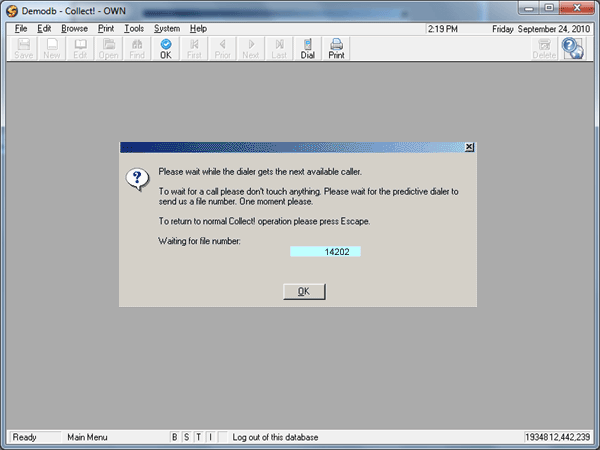
Predictive Dialer Waits For Call
See Also
- Dynamic Data Exchange
- Predictive Dialer - Technical Specifications
- Predictive Dialer Topics
- How to Use Predictive Dialer
- Operator
| 
Was this page helpful? Do you have any comments on this document? Can we make it better? If so how may we improve this page.
Please click this link to send us your comments: helpinfo@collect.org