Trusted Hosts
The Trusted Hosts form allows you to limit access
to the Web Host to only the IP addresses listed.
This feature may be combined with the /W3
switch to allow these Hosts to bypass system
password authentication. This is useful for real
time updates to the system when using
Web Predictive Dialer.
This feature is available through the System menu,
Network and Environment option.
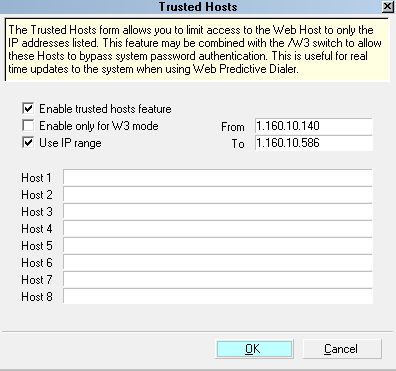
Trusted Hosts form
Enable Trusted Hosts Feature
Switch this ON to use the Trusted Hosts feature. Collect!
Web Host will accept requests only from the Hosts listed
below.
 Please make sure that you enter the IP
addresses that you want to accept requests
from. If you switch ON 'Enable Trusted Hosts
feature' but do not enter any IP addresses,
you are saying " trust no one" and Web Host
will fail to connect.
Please make sure that you enter the IP
addresses that you want to accept requests
from. If you switch ON 'Enable Trusted Hosts
feature' but do not enter any IP addresses,
you are saying " trust no one" and Web Host
will fail to connect.

Enable Only For W3 Mode
Switch this ON to only enable the Trusted Hosts
feature when Web Host is started with the /W3
command line option.
When this switch is ON:
If you start an instance of the Web Host WITHOUT
the /W3 argument, this list is ignored. All IP
addresses making requests to the Web Host are
evaluated and those with proper passwords are
allowed to access the Web Host screens.
If you start an instance of the Web Host WITH
the /W3 argument, only IP addresses in the Trusted
Hosts list will be allowed to access the Web Host.
This is important because the /W3 switch bypasses
the system password authentication process.
See Command Line Startup Options for more
information.
Use IP Range
Switch this ON with a check mark to enable access
to a range of IP addresses listed in the From
and To fields below.
From
Enter the beginning IP address of a range of
Hosts that you want to enable to access the Web Host.
To
Enter the ending IP address of a range of Hosts
that you want to enable to access the Web Host.
Host 1
Enter the IP address of a Host you wish to allow to
access the Web Host.
Host 2
Enter the IP address of a Host you wish to allow to
access the Web Host.
Host 3
Enter the IP address of a Host you wish to allow to
access the Web Host.
Host 4
Enter the IP address of a Host you wish to allow to
access the Web Host.
Host 5
Enter the IP address of a Host you wish to allow to
access the Web Host.
Host 6
Enter the IP address of a Host you wish to allow to
access the Web Host.
Host 7
Enter the IP address of a Host you wish to allow to
access the Web Host.
Host 8
Enter the IP address of a Host you wish to allow to
access the Web Host.
OK
Select OK to save any changes you have
made and return to the previous screen.
Cancel
Select CANCEL to ignore any changes you
have made and return to the previous screen.
See Also
- Web Host Topics
| 
Was this page helpful? Do you have any comments on this document? Can we make it better? If so how may we improve this page.
Please click this link to send us your comments: helpinfo@collect.org