Operator Sample - Account Toss Operator
This sample shows an Account Toss Team operator
setup. An sales team operator would never need to
sign into Collect!. This operator setup is used by
Collect! to help with assigning multiple accounts to
many operators when using Collect!'s "Assign accounts
to operator" functions.
The effect of the settings shown on the Operator
form in this sample are explained in further detail below.
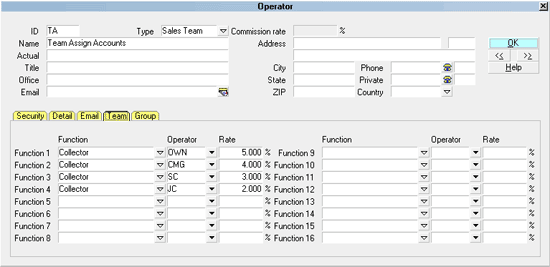
Account Toss Operator
The Operator ID will be used to assign accounts
to the operators listed in the Operator Team tab.
The user's Operator Name will help you identify this
team.
The Operator Type has been set to SALES TEAM
which allows you to access the Operator Team tab
and member setup fields.
All other switches and fields are not necessary for this
operator setup.
The "Sales Team" is meant to hold the Operator IDs that
comprise a distribution group of collectors that the Account
Toss batch process will use. This ID is not one that is meant
to be used as a login ID for a live person.
All other switches and fields are hidden as they are not
necessary for this operator setup.
Account Toss Operator Team
The IDs listed in the OPERATOR column are the operators
who will be included in your distribution Account Toss team.
If you select a Round Robin type of distribution, the
accounts can be assigned to the operators in this team
in the manner of cards being dealt around a table; it
keeps dealing until there are no more accounts to be
given. If every collector's ID was in the Operator column
only once, then this would result in an EQUAL
distribution of accounts amongst the team.
It does not attempt to balance dollar amounts to each
operator and it does not take into consideration
any of the shelf inventory currently on any of the
collector's desks (see Balance the Assigned Accounts).
If you have large teams, it is also possible to nest Team IDs
so that if necessary, hundreds of collectors could be associated
with one actual working team - it is not limited to the 16 available
fields which are visible when you click into the Team tab on an
Operator setup screen.
Alternatively, you may wish to use the Round Robin method
to utilize a WEIGHTED distribution across
the team.
Scenario #1: you may wish a Team Lead/Manager to cover a
collector's share of new business while they are away on
vacation, etc. Getting extra shares of accounts onto a
specific collector's desk is accomplished by inputting the
collector ID so that it becomes weighted by being in the Operator
list more than once. Use of fractional math is how to determine
how many times you need to put the ID into the Team Operator list
to achieve the ratio you are seeking to distribute to the weighted
collector(s).
In this example, Team "TA" is comprised of collector IDs OWN, CMG,
SC, and JC, as in the screenshot below.
Account Toss Operator
If each ID appears in the list one time, each collector's share
will be 25% if there are four of them total on the team.
If we wanted to give collector CMG all of the New Business that
he/she would get PLUS all of SC's new business because SC is going
to be on vacation, then we'd remove collector SC from the Team ID
"TA" and input CMG's ID in a second time. This would increase the
ratio of the distribution to be 50% for the Collection Manager CMG.
When SC returns to the office, that ID would be added back into the
Operator list for Team "TA" and CMG would again appear in the Operator
list for the team only once. Everybody would again be receiving 25%
of the new accounts being distributed.
Scenario #2: If everybody in the team is present and accounted for
but there was reason to want to weight the distribution so that SC
received 40% instead of 25% of the new accounts in this example,
then all that would be necessary to do is input collector SC into the
operator list in the Team tab a second time. As
there are now five IDs in the team, each one would receive a
20% distribution share. If SC is in the list twice, then SC would
receive 2 x 20% = 40% of the new accounts that are being distributed,
while OWN, CMG and JC are each receiving 20% of the new accounts.
The other automated batch Account Toss type in Collect! is called
Balance Accounts. This model does an assessment each collector's
inventory before starting to distribute and with the use of complex
algorithms, it will distribute new accounts to collectors with
a view to maintaining equal account volumes in terms of number of
accounts AND total inventory dollar value on each collector's desk that
is on the team. This type of distribution favors collectors who are getting
accounts off their desk as the model will continually top them up
first before distributing to the collectors who are not finalizing
their inventory at the same rate.
To access the where Account Toss is performed, click "Tools\Batch
Processing\Assign accounts to operators" when you have a tagged list
of new accounts to distribute. When you enter a Team ID to assign
the accounts to, the system will recognize this and prompt you again
to choose whether you wish to perform a "Round Robin" or "Balance" type
distribution.

See Also
- Account Toss
- Operator Basics - Introduction/Accessing
- Operator Samples
- Operator
- Batch Processing
| 
Was this page helpful? Do you have any comments on this document? Can we make it better? If so how may we improve this page.
Please click this link to send us your comments: helpinfo@collect.org