Database Maintenance
Database Maintenance presents you with several options for
maintaining your CV11 database from within Collect!. By default,
complete maintenance rebuilds and fixes all of Collect!'s
individual databases.
We recommend you backup critical data files before running
maintenance since, if the machine is failing, the maintenance,
while manipulating data files, may cause undesirable
consequences and, potentially, loss of data.
 Please refer to Backup Database Topics for options
for backing up your files.
Please refer to Backup Database Topics for options
for backing up your files.
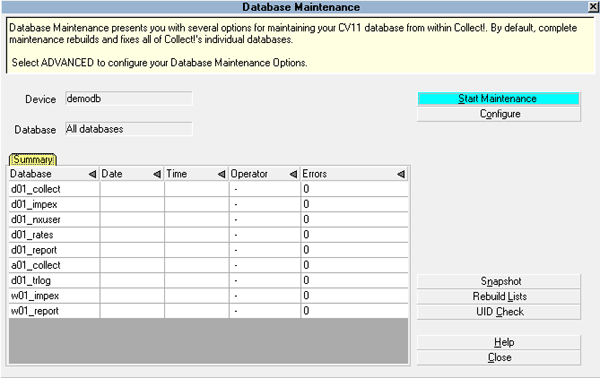
Database Maintenance
Select CONFIGURE to configure your Database Maintenance Options.
Please refer to How To Maintain Your Database
for details and tips for performing database maintenance.
Device
This is the name of the database that you are about to
maintain. This is the registered name of the database
in the RDM Server.
Maintenance runs on the database you are signed into.

Database
This displays the individual Collect! database that
you are repairing. By default, this field displays "All
databases" and maintenance will repair all five
databases contained in Collect! This setting may
be modified by selecting the ADVANCED button.
Start Maintenance
Select this button to begin the maintenance procedure
using the settings that are displayed.
Configure
Select this button to display the Database Maintenance Options
form where you may view or modify the settings for the
Database Maintenance procedure.
Snapshot
Select this button to snapshot your core database files.
Please refer to Database Snapshot for details.
Rebuild Lists
Select this option to rebuild Collect!'s internal meta data
tables. Import definitions, printable information and access
rights lists are rebuilt.
 This may take a bit of time, depending on
your particular Collect! usage and the number
of users you have. You may want to rebuild
just one of these lists rather than all three.
Please refer to Help topic Rebuild Lists for
details.
This may take a bit of time, depending on
your particular Collect! usage and the number
of users you have. You may want to rebuild
just one of these lists rather than all three.
Please refer to Help topic Rebuild Lists for
details.
UID Check
Select this option to quickly check the integrity of your
database. You can select specific areas to check, or
check all registered devices. The utility also fixes any
errors that are encountered if it is run in EXCLUSIVE
mode, otherwise, errors are simply reported.
Please refer to Help topic, UID Maintenance for further
details.
Help
Select this button to view help on the Database Maintenance
form and related topics.
Close
Select this button to close the Database Maintenance form
and return to the previous form.
Summary
This table displays the Collect! Databases and gives
the Date and Time maintenance was performed on
each database. The ID of the Operator who ran
maintenance is also displayed.
The Errors column lists the number of errors found
and repaired.
See Also
- How To Maintain Your Database
- Database Maintenance Options
- UID Check
| 
Was this page helpful? Do you have any comments on this document? Can we make it better? If so how may we improve this page.
Please click this link to send us your comments: helpinfo@collect.org