Variable Interest
The Variable Interest feature enables you to easily and
automatically calculate variable interest rates on your accounts
based on an underlying interest rate index table. You can
have one or several Principal transactions on each account.
Collect! uses the Payment Date of each Principal transaction,
plus 1 day, for the initial "Calculate interest from date".
Subsequent calculations are read from the date ranges
and interest rates contained in the interest rate index.
 Variable Interest is a licensed extension module.
Contact us for pricing if you require this
functionality.
Variable Interest is a licensed extension module.
Contact us for pricing if you require this
functionality.
If you are entering Judgments in Collect!, ensure you have
verified with your legal counsel that this is the calculation
of choice before enabling a Variable Interest calculation
on Judgment accounts.
There are several parts to the Variable Interest feature:
Variable Interest Rate Index
The interest rate index is a CSV file that you create with
two columns, representing the Interest Start Date and
Interest Rate. Enter the date ranges and interest rates that
you require. Each Interest Start Date is the date you want
Collect! to start using the interest rate listed in the
corresponding Interest Rate column.
Example:
| Interest Start Date | Interest Rate |
| 01/01/2008 | 7.50 |
| 06/01/2008 | 8.65 |
| 01/01/2009 | 9.75 |
| 03/01/2009 | 9.80 |
| 06/01/2009 | 9.90 |
| 09/01/2009 | 10.0 |
These columns do not have labels. The column
headings above are for demonstration purposes, only.
Sample CSV
Each entry has to be on its own line.
"01/01/2008","7.50"
"06/01/2008","8.65"
"01/01/2009","9.75"
"03/01/2009","9.80"
"06/01/2009","9.90"
"09/01/2009","10.0"
 Even if you have not entered your dates in a completely
date ordered sequence, the system will apply an
ascending sort order when it reads the interest
rates file.
Even if you have not entered your dates in a completely
date ordered sequence, the system will apply an
ascending sort order when it reads the interest
rates file.
Save your settings as a CSV in the cv11\bin\vinterest
folder.
After editing the interest rates table and saving your
CSV, it is necessary to logout of Collect! completely
and log back in to read the new changes.

Date Format
Collect! uses the settings from the Date Format screen when
reading the variable interest CSV.
System date format is accessed by the menu path
"System\ Preferences\ Options, Sounds and Colors\Date Format".
Client Settings
You must specify which clients will use this interest
rate index.
Select and enter a client for whom you are setting up
variable interest, and click the Advanced button
in the lower right corner of the screen. This will
open the Client Settings screen. In the upper right corner
of this screen, the third field down is called Variable
interest rates file. In this field, enter the
filename of the CSV file you created.
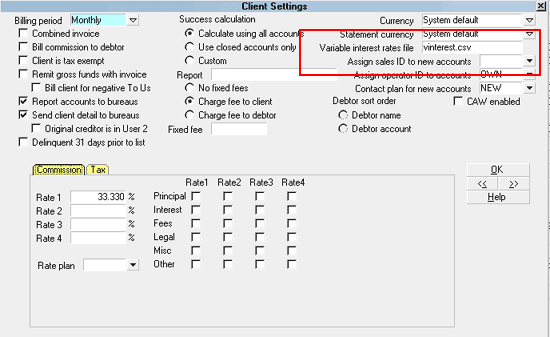
Variable Interest Rates File
If you have several clients with different
requirements, you can create an interest rate
index CSV for each one. Just name each uniquely
and place them all in the cv11\bin\vinterest folder.
After placing CSV files in the "vinterest" folder, you must completely
logout of Collect! and log back in again. This is the only way that
the new interest rate table(s) will be read by the session you have
initiated.
Debtor Interest Detail
Please examine any Principal Transactions
existing on each account and ensure that you
agree with the date in the Payment Date field.
The system uses the Payment Date of each
Principal transaction, plus 1 day for the initial
"Calculate interest from date".
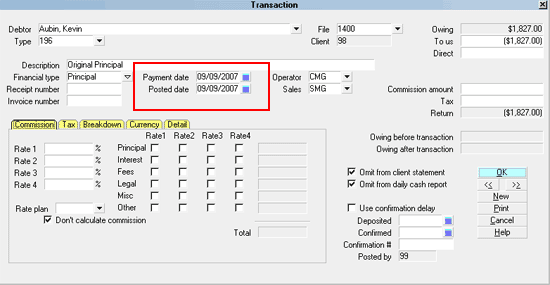
Principal Transaction
To enter the Interest Detail screen on a debtor, click into a
Principal amount field on the front face of the debtor screen.
This will open the Financial Detail window. The Interest Detail
Tab is located in the mid-screen, left side of the screen.
Once you have entered the Interest Detail Tab, you then click the
Interest Type drop-down arrow and select Variable
Interest from the pick list.
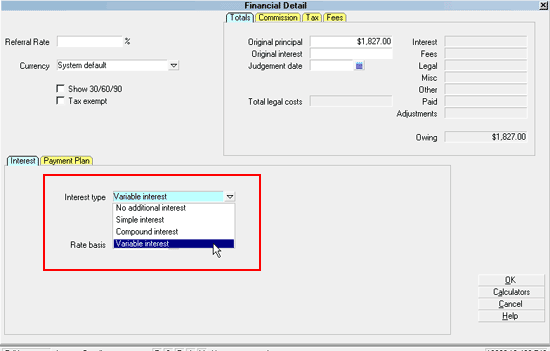
Interest Type Variable Interest
Collect! 'hides' most of the other usual interest settings you
would expect to see for simple interest because for variable
interest, the same fields are not user-defined but predicated
by the CSV rate table created. You can select the appropriate
Rate Basis.
Select "Ordinary" for your Rate Basis if you want to
dynamically calculate the interest taking into
consideration the number of days in each year.
If you select one of the other options for
Rate Basis, this will be the value the system
will use for every interest period in your Variable
Interest Rates file, regardless of the actual number
of days in the year.
As soon as you close the Financial Detail screen, Collect!
calculates the interest for the account and displays it in
the Debtor's Interest field.
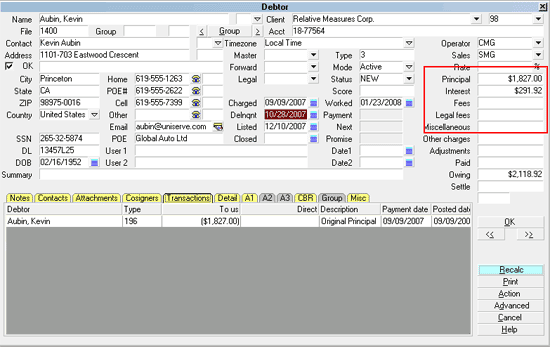
Total Interest Calculated and Displayed
The calculation of interest is dynamically reset according to
your settings. You must RECALC the Debtor to see any new changes.
When using Variable Interest, you should recalc
all your accounts each day.
Examining Variable Interest Rate Breakdown
Once you have initially set up the Variable Interest feature,
it is a good idea to follow the accounts and verify that your
calculations are giving expected results. This would indicate
that your rate tables are typo free. It is recommended to
activate a debug switch to assist you with your initial follow-ups
on how your Variable Interest calculations are doing.
To enable the summary window popup, you set switch
ON for Enable internal debug checks which
is located by the menu path \System\Preferences\Options,
Sounds and Colors. Place a check in the box beside the
option "Enable internal debug checks".
This switch is meant for debugging only. It should
not be left on for normal usage of Collect!.
Once this feature is enabled, you will see an interest breakdown
summary displayed whenever you view the Debtor.
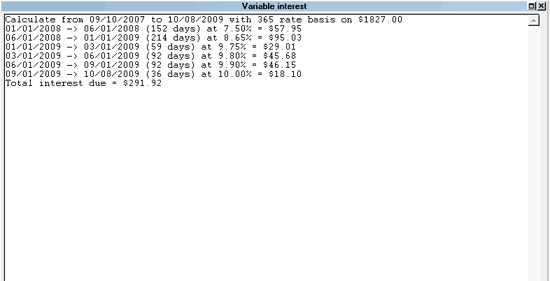
Interest Calculation Breakdown
When you have more than one Principal transaction, the system
shows you the breakdown for each principal amount.
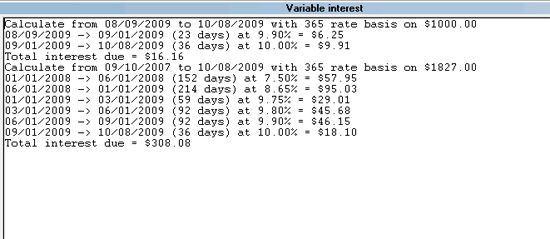
Interest Calculation for Two Principal Amounts
Variable Interest Calculations
Variable Interest calculations use the formula:
I = A((1+R/N))^n)-1)
I = Interest due
A = Assessment amount (Ex. 1827.00)
R = Annual interest rate (Ex. 9.00)
N = Number of days in the year (Ex. 365)
n = Number of days in the date window (Ex. 180)
Example:
On $1827 at 9%:
01/01/2009 -> 06/30/2009 (180 days) at 9.00% = $82.90
82.90 = 1827((1+.09/365)^180)-1)
The number of days in the year (N) is determined by
the Rate Basis you set in the Interest Detail.
Select "Ordinary" if you want to dynamically
determine the number of days in each year. Select
one of the other options (360, 364 or 365) if you
want to use a fixed number of days in the year for
every interest period in your table.
When using Variable Interest, you should batch RECALC
your debtor accounts every day.
For debugging purposes, the calculations may be displayed
when you access the Debtor screen, as above-noted. Rates
are set as soon as accounts are recalculated either
by opening a Debtor, or through \Tools\Recalculate.
Interest is simple interest, floating point values are truncated,
immaterial Interest Detail fields are hidden and calculation is
based solely on the CSV interest rate table.
Collect! uses the Principal transaction's Payment Date
plus 1 day as the Calculate Interest Start Date.
Multiple Principal transactions are each calculated separately
from Payment Date plus 1 day and totals are added into the
Interest Field on the Debtor screen. Switching on "Enable
internal debug checks" displays a calculation summary to initially
assist you with verifying the calculations for each interest
bearing Principal transaction applicable on the account. This
is a temporary measure meant to assist with preliminary stages and
should be turned off once the process is vetted and confirmed
working soundly, meaning the CSV tables created are accurate.
Payments
When a payment is posted to an account, it will affect the
Variable Interest calculations if the payment reduces the
account's outstanding Principal. Depending on the agreements
between the debtors and the creditors, you may have your payment
hierarchy set with the Collect! shipping default which applies
payments to Fees, then Interest, then Principal, OR, you may
be using a modified hierarchy that applies all payments to
Principal first. Any payment that reduces the total Principal
will result in interest being calculated on the new, reduced
Principal amount.
You control payment breakdown hierarchy with options
set in \System\ Financial Settings\Transaction
Types windows. Each Financial Type Payment
transaction should have the default order of
operations set to match your agency's preference.
Troubleshooting Variable Interest
There are a few situations that may result in an error when
using the Variable interest feature.
Failure Reading CSV File
This error may occur if you have failed to create the CSV
properly. The format must be standard, as displayed above.
If there is a typo in any of the cells, you will get this message.
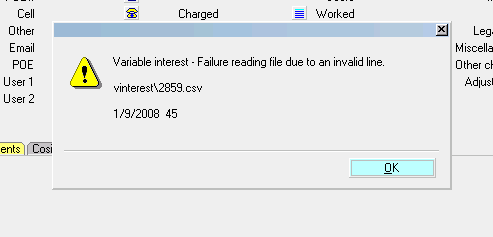
Invalid Line in Interest CSV
The message shows you the error. There is no comma
between the values for the date and the rate.
Failure Opening CSV File
This message usually indicates a file named differently from
what you have in your Client Settings. Go to the client,
click the Advanced button to enter the Client Settings screen,
and compare what you have entered in the "Variable interest
rates file" field with the actual name you stored in the
CV11\bin\vinterest folder.
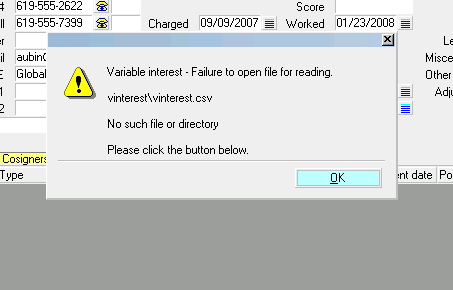
Failure Opening CSV File
See Also
- Interest Detail
- Client Settings
| 
Was this page helpful? Do you have any comments on this document? Can we make it better? If so how may we improve this page.
Please click this link to send us your comments: helpinfo@collect.org