How To Setup Account Matching
Where one debtor has multiple accounts in your office, it is
efficient inventory management strategy to mitigate redundancy
and lost opportunities (i.e. payout given without a collector's
awareness that there were additional debts owed) by grouping
accounts together.
To enable the system to perform logic checks for you
automatically as accounts are being entered manually or
grouped by a batch process, there is an Account Matching
Setup window that needs to be filled out. This setup window
will contain your company's preferences and parameters that
the system will use as default settings to decision whether
each incoming account is the same person as any debtor in
pre-existing inventory. It also contains general defaults
that will govern what other possible actions will, or will not,
happen as a function of accounts being grouped together.
The Account Matching Setup window is located via the menu path
"System\Preferences\ Plans and Reference Tables\Account Matching
Setup".
The window is organized into sections labelled Options, Check, Copy,
Cascade and Advanced Match Conditions.
Options
Enable Account Matching
Check this ON if you want to use automated account matching. Leave
it unchecked if you will not be utilizing grouping at all.
Prompt before cascading changes
Check this ON if you want the system to give you a popup window
to which the user must respond by clicking Yes or No each time
it prepares to cascade data across the group. Leave this unchecked
if you want the system to cascade information as per the switch
settings, with no prompt to the user.
Prevent cascade when closed
Check this ON if you want the system to ignore any account with
Mode "Closed" that may be part of a group when information is
available to be cascaded. This is a popular switch to have
turned ON where agencies are required by their clients to
cease documenting accounts in any way once accounts have been
closed/recalled/reassigned to other agencies. This switch
ensures only accounts with Mode Active (and any status)
will be eligible for auto-cascade.
Cascade Phone Deletions
Check this ON if you want the system to remove the same phone
number on all accounts in the group at the same time (Mode
Active or Closed being governed by the switch above). Leave
this unchecked if you do not want auto-removal of a phone number
on all matching accounts.

Check
The switches in this section decide whether a user will be
presented with a browse list of "near" matches when data-entering
New Business or keying in a search for a specific debtor.
Recommendation is to leave all of the switches in this section
OFF rather than have your staff being inundated with lists of
accounts that are not remotely related to the new debtor or
account being searched for.
Copy
The switches in this section are inquiring for specific fields
you may, or may not, wish to have auto-copied to NEW accounts from
EXISTING accounts if there is a grouping taking place.
Recommendation is to leave all of these switches in this section
OFF. If there is any error or omission in existing inventory OR
the new account incoming has more recent / good demographics, then
having this switch ON will mask that data with the overwrites.
Additionally, if your office does litigation, you would not want to
alter the exact name with which the debtor entered into their
obligation with the creditor.
Cascade
The switches in this section pertain to how the system will
handle updates made to an account that is a member of a group
of accounts. There are 11 different types of cascades you
can turn ON or OFF, as per your site's preferences. Because
these switches overwrite existing data on all files in the
group (Active or Closed, depending on a separate switch under
Options), we recommend extreme care be taken and that your Access
Rights " Log to Notes" switches are set on individual fields.
Because typographical errors can also occur with staff doing
field updates that will cascade, you may also wish to limit which
fields are allowed to cascade.
As of version CV11.6.2.9, the ability to cascade Notes became
part of the Account Matching functionality. This feature
increases productivity manyfold as now your collectors will NOT
have to copy/ paste their notes onto multiple accounts to ensure
that all of the files in the group have received workstandard
activity compliant with your clients' expectations.
Advanced Match Conditions
This section governs what criteria will be used to decision
whether an incoming account is a match to one or more accounts
already existing in your database AND what fields to make
comparisons with when accounts are being manually grouped
together by a user.
Collect! ships with a set of default match conditions that
should be reviewed and updated for your site's preferences before
commencing to group accounts manually or via batch process.
The entry area is visual, but represents Boolean logic checks:
reading across horizontally, these are fields which are joined
by "AND" conditions. Example, the match will only be made if the
Name AND social security number of the NEW account compared to
an existing account are the same. If that is not true, then the
decision tree moves to the next condition. The separate lines
of conditions are joined by an "OR" mathematical operator. It is
the "OR" condition that allows the process to continue to read
vertically through the four lines of logic the system provides
to define matching criteria. While it sounds laborious, the
software manages these checks live while a staff member is working
or in batch mode very quickly.
Accounts which are successfully matched will become associated
with a system assigned Group ID Number along with the sequential
Group Member Number each account is separately assigned to
distinguish each account within the group.
Group Tab On Debtor Accounts
After you have setup the global Account Matching Setup, you can
fine-tune your data sharing options on a per group and individual
account level. When you are on a Debtor screen, click the Group
Tab to access the Group Details window. This will list all debtors
in the group and summary totals representative of all debtor
accounts in this group.
There is a Member Setup button in this screen. Click the button when
any particular group member is selected and you will see the
settings for that specific Debtor.
If you modify any settings on this specific debtor that differ from
the system global Account Matching Settings for which fields to
share/cascade across all files, it will be these new, individual
settings that will override the global defaults from that point
forward. This can be useful if you have a client with different
preferences as compared to the rest of your database.
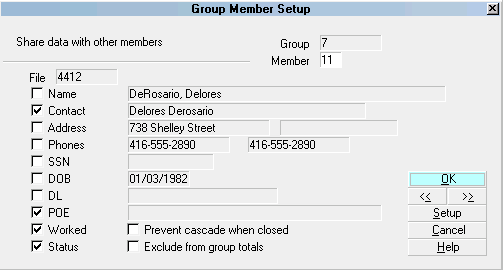
Group Member Setup Window
As of CV11.6.2.9, another new feature to the Group suite of
capabilities is the Shared Notes tab. This feature provides
a thumbnail view of ALL notes on ALL accounts within the group
consolidated into a single Shared Note tab. If a user is
looking for a specific note in a particular date range but
does not recall which individual file it may be located on, this
tab would be a handy utility tool.
The switch within the Group Member Setup does not automatically
turn itself on. There is a Writeback report on the
Member Center in the Utility Reports and Snippet section which
Members may download to set these switches globally in their
existing grouped accounts and add into contact plans to
routinely switch on the items of interest in new accounts grouped
go forward. The mini-package with instructions is called "Group
Notes - Cascading and Share Notes Tab".
Adding A New Debtor To An Existing Group
When you enter a new Debtor and Collect! finds matching
accounts in the database, it will alert you and allow you to
add this new Debtor to the existing group. The procedure for
adding the Debtor, at this point, is the same as ordinary grouping
procedure described in Help on Grouping Debtors below.
See Also
- How To Group Debtors
- Account Matching Setup
| 
Was this page helpful? Do you have any comments on this document? Can we make it better? If so how may we improve this page.
Please click this link to send us your comments: helpinfo@collect.org