Group Members
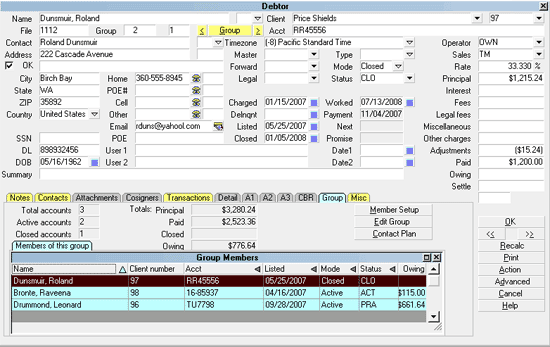
This list is accessed by clicking on the Group Tab from
any Debtor screen which has a yellow Group button and also
a yellow Group Tab label, indicating that the Tab is populated
with data. All group members are numbered from 1 to 999. You
can view full screen account details for each member by toggling
to the account using the navigation arrows next to the GROUP
at the top of the Debtor screen.
Group Members
To maximize the list view to full screen, click the small square
in the "Group Members" list title bar. To return it to regular
size, click the small "x" beside the Maximize icon. If the number
of accounts in the group exceeds the regular view size, you can
also use the scroll bars along the right side of this list as well
to surf through the list.
 The Group Members list in the Group Tab is Read Only. Click
the Edit Group button inside this subfile to view
a list of all the accounts in this group. From
this view, you may select any one of the records
to quickly go to that account. This is also the
button you would select if you wanted to ungroup
one or more accounts from the Group ID.
The Group Members list in the Group Tab is Read Only. Click
the Edit Group button inside this subfile to view
a list of all the accounts in this group. From
this view, you may select any one of the records
to quickly go to that account. This is also the
button you would select if you wanted to ungroup
one or more accounts from the Group ID.
If your Group Member IDs are no longer sequential due to removing
members from the group, you can run a utility report to re-sequence
them via the path "Tools\ Utilities\ Group Member Renumbering". You
will be prompted whether you wish to reorder by List Date as well and
provided with the instructions to do so if such was the preference.
Within the view of the Group Tab, you will note that you are provided
with a series of fields that summarize the totals of all the members
within the group of interest: Total Accounts, Active & Closed, Totals
for Principal, Paid and Owing amounts.
The Total values in this screen depend partly on the settings
in the Group Member Setup. If you switch ON "Exclude from
group totals" on one or more of the accounts in the Group
Member Setup, they will not be calculated into the totals
within the Group Tab tally.
The following provides a field by field description of the figures
displayed within the Group Tab:
Total Accounts
This is the total number of accounts in
this group.
If you switch ON "Exclude from group
totals" in the Group Member Setup for
any group member, that account and its
figure details will not be calculated
into this total.

Active Accounts
This is the number of active accounts
in this group.
If you switch ON "Exclude from group
totals" in the Group Member Setup for
any group member, that account and its
figure details will not be calculated
into this total.
Closed Accounts
This is the total number of closed accounts
in this group.
If you switch ON "Exclude from group
totals" in the Group Member Setup for
any group member, that account and its
figure details will not be calculated
into this total.
Totals
The figures in this column represent total
dollar values for all accounts in the group.
Be sure to regularly Recalc your Debtors
so that their Financials and Group Totals
are current.
If you switch ON "Exclude from group
totals" in the Group Member Setup for
any group member, that account and its
figure details will not be calculated
into this total.
Principal
This is the total amount of Principal for
all accounts in the group.
Be sure to regularly Recalc your Debtors
so that their Financials and Group Totals
are current.
If you switch ON "Exclude from group
totals" in the Group Member Setup for
any group member, that account and its
figure details will not be calculated
into this total.
Paid
This is the amount Paid to date by all
accounts in the group.
Be sure to regularly Recalc your Debtors
so that their Financials and Group Totals
are current.
If you switch ON "Exclude from group
totals" in the Group Member Setup for
any group member, that account and its
figure details will not be calculated
into this total.
Closed
This is the amount still due and Owing by
all Mode Closed accounts in the group. If
you have a 'closed status' but have left the
account in Mode Active, that account's
figures will be represented in the Active
accounts.
If you switch ON "Exclude from group
totals" in the Group Member Setup for
any group member, that account and its
figure details will not be calculated
into this total.
Owing
This is the total amount Owing by all
accounts in the group.
Be sure to regularly Recalc your Debtors
so that their Financials and Group Totals
are current.
If you switch ON "Exclude from group
totals" in the Group Member Setup for
any group member, that account and its
figure details will not be calculated
into this total.
Member Setup
Click this button to open the Group Member
Setup screen where you can view or adjust
the Share and Cascade option settings for an
individual account within the group.
The option switch to "Exclude from group
totals" is located within this screen.
Check the box ON if you do not want a
member within the group to be ignored in
Group Totals when Recalcs are performed
either manually or by batch process.
Edit Member
Click this button to view a list of all the
accounts in this group. You may select any
member from the list to quickly open the
Debtor screen to see the full account
details for the selected account.
Edit Group
Click this button to add or ungroup one or more
accounts to the existing group. This is done by
tapping your Space bar on one or more accounts
you wish to ungroup to remove the tag.
To include a currently standalone account
into the group, scroll to the one or more
accounts you wish to add in and press your
Spacebar to highlight the items, then press
F8 to return to the Group Member Setup screen.
Contact Plan
You can run a specific Contact Plan on all
members of the group using this feature.
Members Of This Group
This is a list of all Group Members.
Within the Group Members list, you are able to sort
ascending/descending any field which displays the familiar
triangle to the right of the column label and Right clicking
your mouse anywhere in the column header row will popup the
Insert/Remove fields options so that you may customize your Group
Members view to show which fields are meaningful to your site
and in which display order right-to-left you wish them to appear.
See Also
- Group Member Setup
- Account Matching Setup
- Using Account Matching
- How To Setup Account Matching
| 
Was this page helpful? Do you have any comments on this document? Can we make it better? If so how may we improve this page.
Please click this link to send us your comments: helpinfo@collect.org