Company Details
The Company Details form stores name and address information
about your company. This can be printed on reports and letters
and is used in credit bureau reporting. Some Client Settings
values are set up automatically for you based on information you
enter in the additional fields on this form.
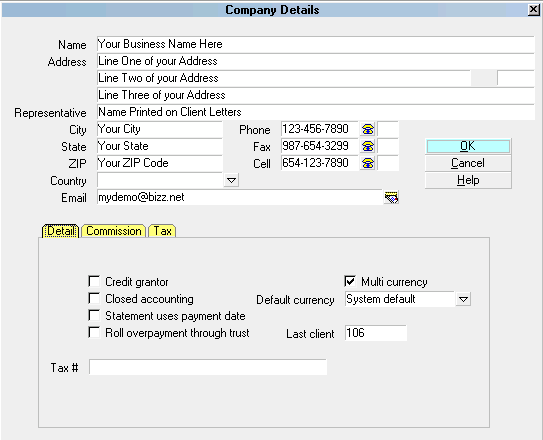
Company Details form
 Please refer to Company Details Basics for steps to
access this form.
Please refer to Company Details Basics for steps to
access this form.
The Company Details form is a very convenient way to store and
access your company information. Any field of the Company Details
form can be pulled into a report or letter from anywhere in the
system because all the Company Detail information is loaded into
memory when you sign into Collect! Name, Address and Phone
lines are used for credit bureau reporting. You can run multiple
companies by logging into different databases. Each database
stores its own company details.
Name
Enter the name of your company as you would
like it to appear on reports and letters. If you
are using the credit reporting module,
please enter your company's name as you would
like it to appear in credit bureau Metro2
output file header records.
The Name field is 40 alpha-numeric
characters and is referenced in reports
by using the Printable Field Code @cd.na

Address
Enter your Street Address. There are three
address lines on this screen. The
information you enter in these lines
can be pulled into reports and letters.
The information in these three lines is
also included in header record of your credit
bureau Metro2 output files.
The format with which you enter your
information is up to each agency. However,
we recommend using Postal Addressing
Standards that are applicable to your
country. These are generally available
by looking up the website of the postal
service for your region.
Example:
Name - Your Company Name Goes Here
Address - Your Company Address
Address 2 - Company Addr2
Address 3 - Company Addr3, or Website Address
Representative - Default Report Name or Leave Blank
City - Your Company City
State - Your 2 Position State/Province Code
Zip - Your Zip/Postal Code
Country - Choose From Pick List or Leave Blank
Email - Any Company Email Address or Leave Blank
The Address field is 40 alpha-numeric
characters and is referenced in reports by
using the Printable Field Code @cd.ad
Address 2
This address field can hold your second
address line or other information you may
wish to store for later use/output to
reports or letters.
The Address2 field is 30 alpha-numeric
characters and is referenced in reports
by using the Printable Field Code @cd.a2
Address 3
This address field can hold your third
address line or other information you may
wish to store for later use/output to
reports letters.
The Address3 field is 30 alpha-numeric
characters and is referenced in reports by
using the Printable Field Code @cd.a3
Representative
Optional. Enter the name of your company
representative. This may be the Owner
or President's name. Some of the sample
letters and reports have this field built in
as a placeholder, but these can also be
removed or commented out of the report by
placing two slashes in front of the printable
field code: i.e //@cd.re<
The Representative field is 40 alpha-numeric
characters and is referenced in reports by
using the Printable Field Code @cd.re
State
Enter your agency's State Code.
ZIP
Enter your agency's ZIP/Postal Code.
Country
Optional. Use the drop-down arrow pick
list to select your Country OR leave blank
if you do not wish to see this field
expressed in reports/letters.
If you leave the field blank and find
any report evidencing an extra blank
line in your company address header,
edit your report and comment out the
Printable Field Code @cd.co< by putting
two slashes in front of it: i.e. //@cd.co<
Email
Optional. This field is used to enter your
agency's central email address or the email
address of your main representative.
Phone
Enter your main office Phone number. The
maximum number of characters can be 23.
This Phone number field is pulled into
many of the sample reports and letters.
Decide on a phone format for your company.
Such as, with hyphens or with parenthesis
around area codes or all numerics/no spaces.
You will find establishing a phone format
convention will ease all lookups by phone
in your system. Lookups read the field
exactly as entered.
Some format examples:
123-456-7890
123.456.7890
(123)456-7890
18004567890
1234567890
You can switch ON 'Only numerics in phone
fields' "System\ Preferences\Options, Sounds
and Colors\ Screen and Messages" so that the
system will disallow non-numeric data in
your phone fields.
The Phone field is 23 alpha-numeric
characters and is referenced in reports
by using the Printable Field Code @cd.ph
If you use the Credit Bureau module, the
Phone number is required and is output
to the header record of the Metro2 formatted
text file when created. The Credit Bureau
module will strip out any non-numeric data
automatically and will use a maximum of 10
digits in compliance with the Metro2 File
Format specifications.
Phone Ext
Optional. This field can be used to enter
an extension for the Phone field, left blank
or repurposed for user-defined storage of
other data.
Fax
This Fax number field is pulled into
many of the sample reports and letters.
Decide on a phone format for your company.
Such as, with hyphens or with parenthesis
around area codes or all numerics/no spaces.
You will find establishing a phone format
convention will ease all lookups by phone
in your system. Lookups read the field
exactly as entered.
Some format examples:
123-456-7890
123.456.7890
(123)456-7890
18004567890
1234567890
You can switch ON 'Only numerics in phone
fields' "System\Preferences\Options, Sounds
and Colors\ Screen and Messages" so that the
system will disallow non-numeric data in
your phone fields.
The Fax field is 23 alpha-numeric
characters and is referenced in reports
by using the Printable Field Code @cd.fa
Fax Ext
Optional. This field can be used to enter
an extension for the Fax field, left blank
or repurposed for user-defined storage of
other data.
Cell
Optional. The Cell number is another phone
number for your company. It is not included
in default shipping sample reports/letters.
Decide on a phone format for your company.
Such as, with hyphens or with parenthesis
around area codes or all numerics/no spaces.
You will find establishing a phone format
convention will ease all lookups by phone
in your system. Lookups read the field
exactly as entered.
Some format examples:
123-456-7890
123.456.7890
(123)456-7890
18004567890
1234567890
You can switch ON 'Only numerics in phone
fields' "System\Preferences\Options, Sounds
and Colors\ Screen and Messages" so that the
system will disallow non-numeric data in
your phone fields.
The Cell field is 23 alpha-numeric
characters and is referenced in reports
by using the Printable Field Code @cd.ce
Cell Ext
Optional. This field can be used to enter
an extension for the Fax field, left blank
or repurposed for user-defined storage of
other data.
Detail
Press F1 for help with Detail Tab system switch
settings and fields which will define key
software behaviors by setting your cursor into
any of the displayed items for selection.
Commission
If all your clients use the same Commission
Rates, you may set a global system default that
will be applied to all clients in the Commission
Tab. Press F1 for detailed help from any field
in this tab.
Tax
If all your clients are subject to the same
rate of Tax on your collection services, you
may set a global system default that will
be applied to all clients in the Tax Tab.
Press F1 for detailed help from any field
in this tab.
Tax Rate
Enter the tax rate, if applicable. This
rate will be entered automatically in the
client settings for every new client that
you enter in your system.
If your agency services multiple regions with
different taxation percentages, do NOT enter
data in this tab on the Company Details.
Instead, fill out the Tax tab on a per client
basis to ensure the correct rate is passed from
the Advanced Client Settings to the debtor
accounts as you enter them.
Tax Rate is a percentage field: i.e. if the
rate is 7%, you would enter 7.0. Tax is
calculated on the commissions that you earn,
not on the total amount you recover.
If you are in a region that has two types of
tax, such as Canada, enter the sum total
percentage tax which you are required to
charge into the Rate 1 field.
The Tax Rate field holds up to 6 digits
(or 5 digits and a period, e.g. 7.4563)
and is referenced in reports by using
the Printable Field Code @cd.tr
The system provides a field to enter a
Taxation # that is alpha numeric, allowing
you input a brief descriptor as well: i.e.
GST# 1050505050505.
Leave the Tax tab blank if you do not
charge tax OR if you have specific rates
that are input into Client Tax Tabs on a
per client basis.
Don't Calculate Tax
Switch this ON if you do not calculate tax.
OK
Click this button to save your changes
and return you to the previous screen.
Cancel
Click this button to ignore any changes
made and return to the previous screen.
Help
Click this button for help on the Company
Details window and links to related topics.
See Also
- Company Details Basics - Introduction/Accessing
- How To Setup Company Details
- How To Start Using Collect!
| 
Was this page helpful? Do you have any comments on this document? Can we make it better? If so how may we improve this page.
Please click this link to send us your comments: helpinfo@collect.org