Quick Search
The Main Menu Quick Search fields is another method
to provide the user with a way to quickly access accounts
by specific keyed information with the least amount of
screen navigating required.
Collector level users do not see the Main Menu. This is
reserved for Management/Administrative/Clerical/Sales user
types.
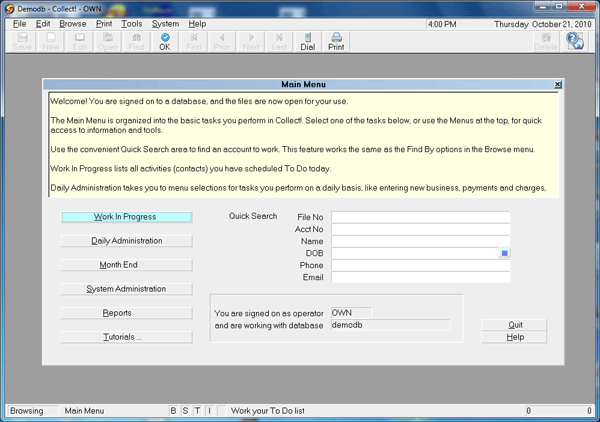
Quick Search in Main Menu
This search feature works the same as any other in the
system. Key in the information you want to search by,
then press your ENTER or TAB key, OR double click on the
field when you are done keying in your search criteria.
The system will return the results of your search.
If it finds 1 unique record that matches, you will be
taken to that record.
If it finds several possible matches
on the basis of partial or similar information entered, you
will be presented with a list of potential matches to choose
from. Highlight the record of interest and either press your
ENTER key or double-click to accept that result, causing the
record to open on your screen.
Quick Search returns a list of close matches.
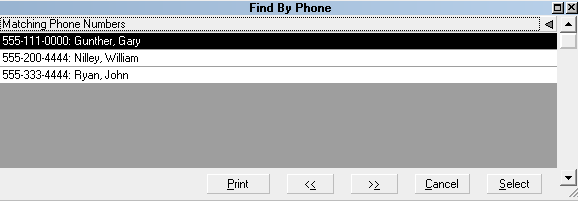
Quick Search Results
If no match is found, you will receive a popup message
acknowledging No Matching Records Found.
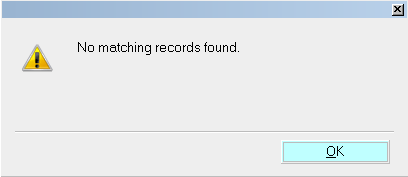
No Matching Records Found
The field is not cleared out when no match is found.
This enables you to check your entry, adding to it
or modifying it as needed to try again.
File No
This option searches for a debtor by the internal Collect!
File Number. The File Number search does not return near
matches - you must enter the correct file number to get matched
and navigated to the debtor file of interest.
Key in the file number you are searching for and either press
your ENTER key or double-click your mouse at the end of the
file number you keyed in. If a match is found, the system
will navigate you to the debtor screen. If no match is found,
you will receive a popup window telling you "No matching records
found".
The incorrect entry of a non-matched file number is left in
place so that if you made a small typo, all you have to do is
edit your last entry rather than re-key the whole number.

Acct No
This option searches for a debtor by their Account Number with
the client that is associated with that debtor. Specifically,
the field called "Acct" that appears under the Client Name on
a debtor screen. These are ideally unique numbers which match
only 1 debtor under 1 client.
You can enter a partial entry and the system will return all
near matches, allowing you to make the final choice of which
account you want to view.
There is a limited ability to use a wildcard to broaden the
the scope of your search. If you use the asterisk at the
beginning of the line followed by any alpha numeric sequence,
the system will search for any Acct numbers that contain the
typed sequence that follows the asterisk.
Example: "*616" looks for all Acct numbers that contain 616
anywhere in their content and will return any list of debtors
found which contain the match criteria. Results could be
Acct numbers that look like B616215 to 4500 5913 0616 1234 to
6165521-35.
 This limited wildcard works only as a prefix
to the search string. It does not work as
a single digit wildcard or as a suffix to a
keyed in search string.
This limited wildcard works only as a prefix
to the search string. It does not work as
a single digit wildcard or as a suffix to a
keyed in search string.
Like File Numbers, client Acct numbers need to be exact to
ensure you have located the correct debtor file of interest.
The limited wildcard search ability could assist if you
could not read handwriting on a debtor check or money order and
were searching for any match to an illegible name and partially
visible address and partially legible Acct #.
Key in your search and either press ENTER or double-click at the
end of your typed entry. If a match is found, you will be
navigated to the debtor screen. If several possible matches
are found, you will receive a list of items to choose from.
Highlight and press ENTER or double-click the item from the list
to be navigated to the debtor of interest. If no match is found,
you will receive a popup advising this.
Name
This option searches for a debtor by Name. You can search
by last name, first name, aka name (if you entered this
into a Cosigner window as an alternate name), partial names
and a limited use of wildcard search ability.
Examples: Key in "mar" to find all names STARTING with mar,
such as Marah, Mark, or Martin. Contrasted with keying in
"*mar" to find all names CONTAINING "mar".
This limited wildcard works only as a prefix
to the search string. It does not work as
a single digit wildcard or as a suffix to a
keyed in search string.
Key in the Name to search for and press ENTER or double-click
at the end of your typed entry. If a match is found, you will be
navigated to the debtor screen. If several possible matches
are found, you will receive a list of items to choose from.
Highlight and press ENTER or double-click the item from the list
to be navigated to the debtor of interest. If no match is found,
you will receive a popup advising this.
DOB
This option searches for the debtor Date of Birth that you enter.
This searches for an exact match. Example: key in "09/10/1956"
to find all matching birth dates.
Key in the Date of Birth to search for and press ENTER or
double-click at the end of your typed entry. If a match is
found, you will be navigated to the debtor screen. If several
possible matches are found, you will receive a list of items
to choose from. Highlight and press ENTER or double-click the
item from the list to be navigated to the debtor of interest.
If no match is found, you will receive a popup advising this.
Phone
This option searches for a debtor Phone Number. You can use
a limited wildcard to broaden the scope of your search.
Example: Key in "616" to find all phone numbers STARTING
with 616. Key in '*616' to find all phone numbers
CONTAINING "616", such as 403-459-0616 or 754-616-8675.
This limited wildcard works only as a prefix
to the search string. It does not work as
a single digit wildcard or as a suffix to a
keyed in search string.
Key in the Phone Number to search for and press ENTER or
double-click at the end of your typed entry. If a match is
found, you will be navigated to the debtor screen. If several
possible matches are found, you will receive a list of items
to choose from. Highlight and press ENTER or double-click the
item from the list to be navigated to the debtor of interest.
If no match is found, you will receive a popup advising this.
Email
This option searches for a debtor Email Address. You
can use a limited wildcard to broaden the scope of your
search. Example: Key in "support@" to find all emails
STARTING with "support@". Key in "*support" to find all
emails CONTAINING "support", such as tech-support@test.com.
This limited wildcard works only as a prefix
to the search string. It does not work as
a single digit wildcard or as a suffix to a
keyed in search string.
Key in the Email to search for and press ENTER or double-click
at the end of your typed entry. If a match is found, you will
be navigated to the debtor screen. If several possible matches
are found, you will receive a list of items to choose from.
Highlight and press ENTER or double-click the item from the list
to be navigated to the debtor of interest. If no match is found,
you will receive a popup advising this.
See Also
- How to Search for Records
| 
Was this page helpful? Do you have any comments on this document? Can we make it better? If so how may we improve this page.
Please click this link to send us your comments: helpinfo@collect.org