EFT Notices Setup
The EFT Notices Setup window is where you enter your
default settings for which letters/notices are
to be automatically generated and how many days in
advance of the next payment due date they are to be
sent.
To access the EFT Notices Setup, the menu path
is "System\ Preferences\ Billing Tree Setup\EFT
Notices Setup".
When you set up and enable EFT Notices for your
recurring payment schedules, Collect! creates a letter
contact for each letter per the parameters entered. The
Due Date of each Letter contact is determined by the
Frequency and Next dates in your recurring payment schedule.
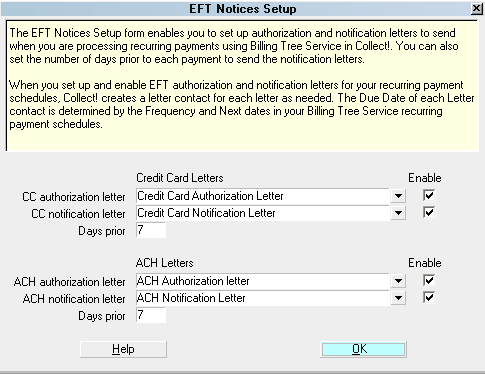
EFT Notices Setup
As of CV11.6.2.9, new Frequencies of First day of the Month
and Last day of the month have been added both for
Recurring Credit Card arrangements, and also as a
Repeat Contact Event frequency.
 It is your responsibility to ensure that any letters
you send to debtors are compliant in format
and content with legislation and regulations
in your region.
It is your responsibility to ensure that any letters
you send to debtors are compliant in format
and content with legislation and regulations
in your region.
View EFT Notices
These sample templates are available
for download from the Collect! Member Center.
Download sample EFT Notices
Credit Card Letters
You can select letters to send to your
debtors when you set up a recurring credit
card payment schedule. Collect! can
automatically schedule an authorization
letter to be sent when you first set up
the payments. Collect! can also automatically
schedule a notice to be sent prior to
each debit from the debtor's credit
card. You can set the number of days
prior to each payment for sending the
CC notice.

CC Authorization Letter
From your list of reports and letters,
select the letter that you want to use
for your credit card authorizations.
You must switch ON "Enable" with a check
mark if you want the module to queue
this letter in your daily letter batch.
Please ensure that you select a valid
letter from your list before you switch
ON "Enable" or the system will Queue an
empty Letter contact.
CC Notification Letter
From your list of reports and letters,
select the letter that you want to use
for your credit card notices.
You must switch ON "Enable" with a check
mark if you want to schedule these notices
in your daily letter batch.
Please ensure that you select a valid
letter from your list before you switch
ON "Enable" or the system will queue empty
Letter contacts.
Enable
Switch this ON with a check mark to
enable the sending of authorization
letters and notices when recurring
payment schedules are set up on debtors.
Please ensure that you select a valid
letter from your list before you switch
ON "Enable" or the system will queue empty
Letter contacts.
Days Prior
Select the number of business days prior
to each payment that you want to queue a
payment notification. You are responsible
for ensuring that you enter parameters that
are in compliance with legislation/regulations
in your region.
ACH Letters
You can select letters to send to your
debtors when you set up a recurring ACH
payment schedule. The system will
automatically schedule an authorization
letter to be sent when you first set up
the payments. Collect! can also
automatically schedule a notice to be sent
prior to each withdrawal from the debtor's
bank account. You can set the number of days
prior to each payment for sending the ACH
notice.
ACH Authorization Letter
From your list of reports and letters,
select the letter that you want to use for
your ACH authorizations.
You must switch ON "Enable" with a check
mark if you want to queue this letter
in your daily letter batch.
Please ensure that you select a valid
letter from your list before you switch
ON "Enable" or the system will
ACH Notification Letter
From your list of reports and letters,
select the letter that you want to use for
your ACH notices.
You must switch ON "Enable" with a check
mark if you want to schedule these notices
in your daily letter batch. Please ensure
that you select a valid letter from your
list before you switch ON "Enable" or
the system will queue empty Letter
contacts.
Enable
Switch this ON with a check mark to enable
the sending of authorization letters and
notices when you set up recurring payment
schedules.
Please ensure that you select a valid
letter from your list before you switch
ON "Enable" or the system will queue empty
Letter contacts.
Days Prior
Select the number of business days prior
to each payment that you want to queue a
payment notification. You are responsible
for ensuring that you enter parameters that
are in compliance with regulations in your
region.
Help
Select this button for Help on EFT Notices
Setup and related topics.
OK
Select this button to close the EFT Notices
Setup window and return to the previous menu.
Deleting A Recurring Schedule
Select this button at the bottom of the
Recurring Credit Card Payments screen to
remove an existing recurring arrangement.
It will remove all pending transactions
from the Billing Tree portal and cancel
any pending EFT Notices or Notification letters
queued up with future dates.
See Also
- Billing Tree Topics
| 
Was this page helpful? Do you have any comments on this document? Can we make it better? If so how may we improve this page.
Please click this link to send us your comments: helpinfo@collect.org